Note
Go to the end to download the full example code.
Fast and accurate transport bijections using BSP-OT
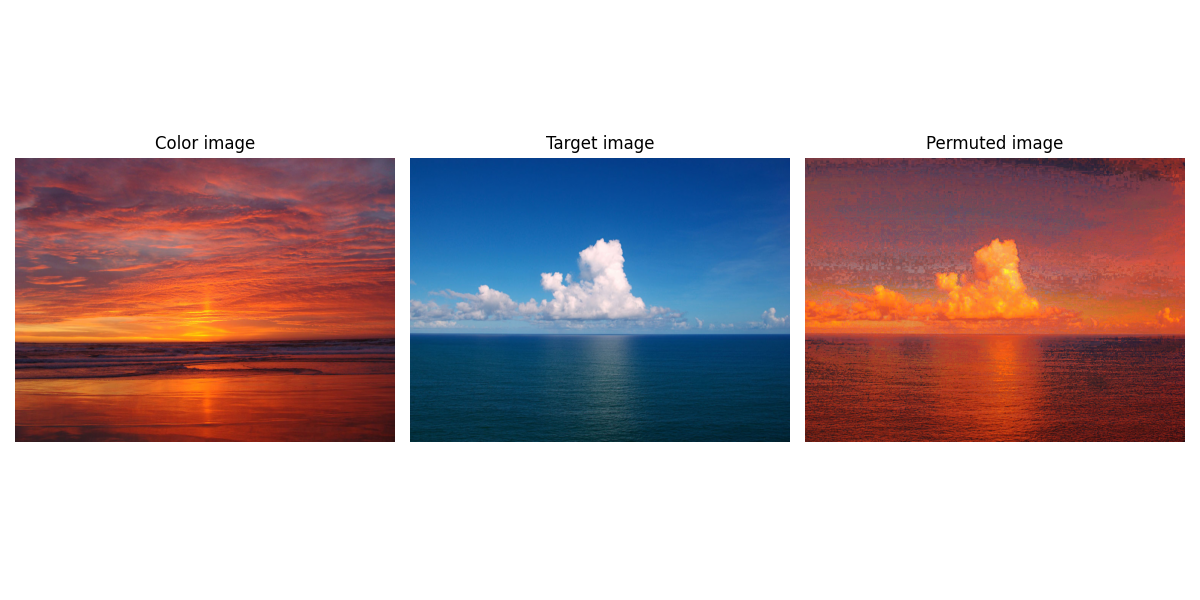
This example shows two use cases for the bijections provided by BSP-OT, between two large point clouds: shape morphing (and animated morphing) and full color transfer (pixel permutation).
[84] Genest, B., Bonneel, N., Nivoliers, V., Coeurjolly, D. BSP-OT: Sparse transport plans between discrete measures in log-linear time ACM Transactions on Graphics, Siggraph Asia (2025).
# Author: Baptiste Genest <baptistegenest@gmail.com>
#
# License: MIT License
import ot.utils
import ot.bsp
import numpy as np
import matplotlib.pyplot as plt
from matplotlib.animation import FuncAnimation
Shape interpolation and morphing
Data generation
For this example, let’s create two large 2D point clouds, one sampled from a single ball, and the other from two smaller balls.
def sample_ball(n, radius=1.0, center=(0.0, 0.0)):
np.random.seed(0)
theta = 2 * np.pi * np.random.rand(n)
r = radius * np.sqrt(np.random.rand(n))
x = r * np.cos(theta) + center[0]
y = r * np.sin(theta) + center[1]
return np.stack((x, y), axis=1)
def sample_two_balls(n, radius=1.0, centers=((-1, 0), (1, 1))):
assert n % 2 == 0, "n must be even"
n_half = n // 2
X1 = sample_ball(n_half, radius, centers[0])
X2 = sample_ball(n_half, radius, centers[1])
return np.vstack((X1, X2))
# ----------------------------
# Load point clouds
# ----------------------------
N = 100000
X_s = sample_ball(N)
X_t = sample_two_balls(N, 0.5)
N = X_s.shape[0]
Bijection computation
The solver returns the transport cost, the final bijection and the intermediary ones used to compute the final one (here we set k = 64). Here we only use the final bijection.
cost, perm, _ = ot.bsp.compute_bspot_bijection(X_s, X_t, 64, 2)
print(
"Bijection computed between {} points, with cost {} in {}s".format(
N, cost, ot.utils.toc()
)
)
Elapsed time : 1.8990379169990774 s
Bijection computed between 100000 points, with cost 0.7974725738723271 in 1.8990379169990774s
As the plan is a bijection, it is simply stored as permutation (e.g. a list of numbers) such that X_s[i] is assigned to X_t[perm[i]]. For the sake of the animation, we reorder X_t according to the obtained bijection such that the points are in correspondence along the morphing animation using simply X_s*(1-t) + X_t*t
Setup animation
# Animation parameters
FRAMES = 100
INTERVAL = 20
# Plot setup
fig, ax = plt.subplots(figsize=(6, 6))
ax.set_aspect("equal")
ax.set_title("Bijective Point Cloud Morphing")
scat = ax.scatter(X_s[:, 0], X_s[:, 1], s=0.05, c="tab:blue")
all_pts = np.vstack([X_s, X_t_perm])
pad = 0.5
ax.set_xlim(all_pts[:, 0].min() - pad, all_pts[:, 0].max() + pad)
ax.set_ylim(all_pts[:, 1].min() - pad, all_pts[:, 1].max() + pad)
# ----------------------------
# Animation update
# ----------------------------
def update(frame):
t = frame / (FRAMES - 1)
t = t * t * (3 - 2 * t)
P = (1 - t) * X_s + t * X_t_perm
scat.set_offsets(P)
return (scat,)
# ----------------------------
# Run animation
# ----------------------------
ani = FuncAnimation(fig, update, frames=FRAMES, interval=INTERVAL, blit=True)
plt.show()
Other example: full color transfer (pixel permutation) using BSP-OT
import os
from pathlib import Path
import numpy as np
from PIL import Image
def im2mat(img):
"""Converts an image to matrix (one pixel per line)"""
return img.reshape((img.shape[0] * img.shape[1], img.shape[2]))
def mat2im(X, shape):
"""Converts back a matrix to an image"""
return X.reshape(shape)
def minmax(img):
return np.clip(img, 0, 1)
this_file = os.path.realpath("__file__")
data_path = os.path.join(Path(this_file).parent.parent, "data")
I1_pil = Image.open(os.path.join(data_path, "ocean_day.jpg")).convert("RGB")
I2_pil = Image.open(os.path.join(data_path, "ocean_sunset.jpg")).convert("RGB")
# force same size to obtain bijection between all pixels
I1_pil = I1_pil.resize(I2_pil.size, Image.BILINEAR)
I1 = np.asarray(I1_pil).astype(np.float64) / 255.0
I2 = np.asarray(I2_pil).astype(np.float64) / 255.0
X1 = im2mat(I1)
X2 = im2mat(I2)
start = ot.utils.tic()
_, perm, _ = ot.bsp.compute_bspot_bijection(X1, X2, 16)
print("Bijection computed between {} pixels in {}s".format(X1.shape[0], ot.utils.toc()))
# reorder the second image according to the obtained bijection
X2_perm = X2[perm]
# reshape back to image
I2_perm = mat2im(X2_perm, I1.shape)
plt.figure(figsize=(12, 6))
plt.subplot(1, 3, 1)
plt.imshow(I2)
plt.title("Color image")
plt.axis("off")
plt.subplot(1, 3, 2)
plt.imshow(I1)
plt.title("Target image")
plt.axis("off")
plt.subplot(1, 3, 3)
plt.imshow(I2_perm)
plt.title("Permuted image")
plt.axis("off")
plt.tight_layout()
plt.show()
Elapsed time : 5.3527059580010246 s
Bijection computed between 750000 pixels in 5.3527059580010246s
Total running time of the script: (0 minutes 35.181 seconds)